
Table of contents
You have ten minutes before your next client arrives. One client still owes you money, two intake forms are missing, and your calendar somehow has a double booking. Not exactly the break you had in mind.
These small headaches add up, especially when you manage a busy clinic or see clients back-to-back.
The best way to avoid this terrible daily situation? Using therapy practice management software because it can make your work much easier. But which one should you choose?
We've reviewed 20 options to help you find the best tool for managing a therapy practice, whether you work alone or manage a team.
TL;DR
- Therapy practice management software helps therapists, counselors, psychologists, and mental health clinics manage daily tasks such as appointment scheduling, client records, billing, clinical documentation, and payments.
- The best software for therapy practice management are:
- 1. Zencal: Best for solo therapists and clinics.
- 2. SimplePractice: Best for solo therapists and small practices.
- 3. TherapyNotes: Best for clinical documentation and insurance billing.
- 4. TheraNest: Best for growing therapy practices.
- 5. Jane: Best for multidisciplinary clinics.
- 6. Sessions Health: Best for budget-conscious solo therapists and small practices.
- 7. TherapyAppointment: Best for therapists who want pricing based on monthly session volume.
- 8. TheraPlatform: Best for interactive teletherapy sessions and online treatment activities.
- 9. ICANotes: Best for detailed clinical documentation and psychiatric practices.
- 10. Valant: Best for larger behavioral health practices that need outcome tracking.
- To choose the right therapy practice management software
- 1. Identify your practice's needs
- 2. Check scheduling and client management features
- 3. Evaluate clinical documentation and billing tools
- 4. Review security, privacy, and compliance
- 5. Compare pricing and test the software
Best therapy practice management tools compared
| Software | Key features | Starting price | Free trial or demo | Best for |
|---|---|---|---|---|
| 1. Zencal | Online booking, paid appointments, automated reminders, client management, team scheduling | $28/month per specialist | 14-day free trial | Solo therapists and clinics |
| 2. SimplePractice | Appointment scheduling, clinical notes, telehealth, insurance billing, client portal | $49/month | 30-day free trial | Solo therapists and small practices |
| 3. TherapyNotes | Clinical documentation, treatment planning, insurance claims, scheduling, telehealth | $69/month | 30-day free trial | Clinical documentation and insurance billing |
| 4. TheraNest | Multi-clinician scheduling, clinical notes, insurance billing, reporting, telehealth | $29/month per therapist | 21-day free trial | Growing therapy practices |
| 5. Jane | Online booking, customizable clinical notes, telehealth, payments, clinic coordination | $59/month | Free demo account | Multidisciplinary clinics |
| 6. Sessions Health | Clinical notes, client portal, scheduling, billing, treatment plans | Free for up to 3 clients; paid plans from $39/month | 30-day free trial | Budget-conscious solo therapists and small practices |
| 7. TherapyAppointment | Appointment scheduling, progress notes, insurance billing, client portal, reminders | $10/month for up to 10 booked sessions | 30-day free trial | Therapists who want pricing based on monthly session volume |
| 8. TheraPlatform | Interactive teletherapy tools, clinical documentation, scheduling, insurance billing | $39/month | 30-day free trial | Interactive teletherapy sessions and online treatment activities |
| 9. ICANotes | Clinical notes, treatment planning, psychiatric documentation, scheduling, billing | $55/month for notes only; $75/month for broader practice management | 30-day free trial | Detailed clinical documentation and psychiatric practices |
| 10. Valant | Outcome tracking, clinical documentation, insurance billing, patient portal, reporting | Custom pricing | Demo on request | Larger behavioral health practices that need outcome tracking |
Best therapy practice management software
1. Zencal: Best for solo therapists and clinics
Zencal is a practice management software that helps therapists, counselors, psychologists, and mental health clinics manage appointments, payments, and client communication.

For example, solo therapists can use Zencal to organize sessions without wasting time exchanging availability messages. You create an appointment booking page, clients use it to book your available time, pay upfront if necessary, and receive automatic reminders before their sessions.
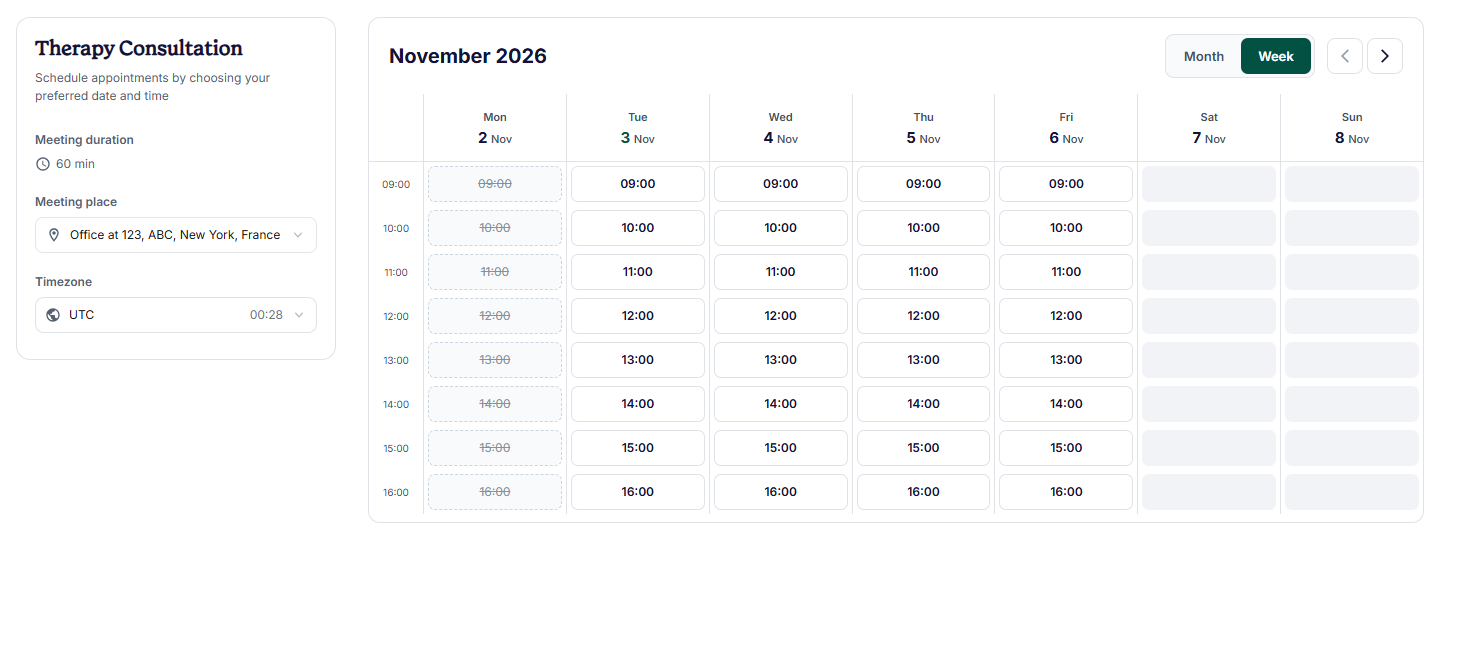
You can offer different appointment types, including individual, couples, family, and group therapy. You can also sell session packages for clients who need ongoing treatment.
What if you are an online clinic? Can Zencal work for you?
Yes, absolutely. Zencal helps coordinate multiple therapists through one booking system. Clients can choose their preferred therapist, while reception staff manage the team's appointments and schedules.
The software also keeps therapy client contact details, appointment history, and payment information together.
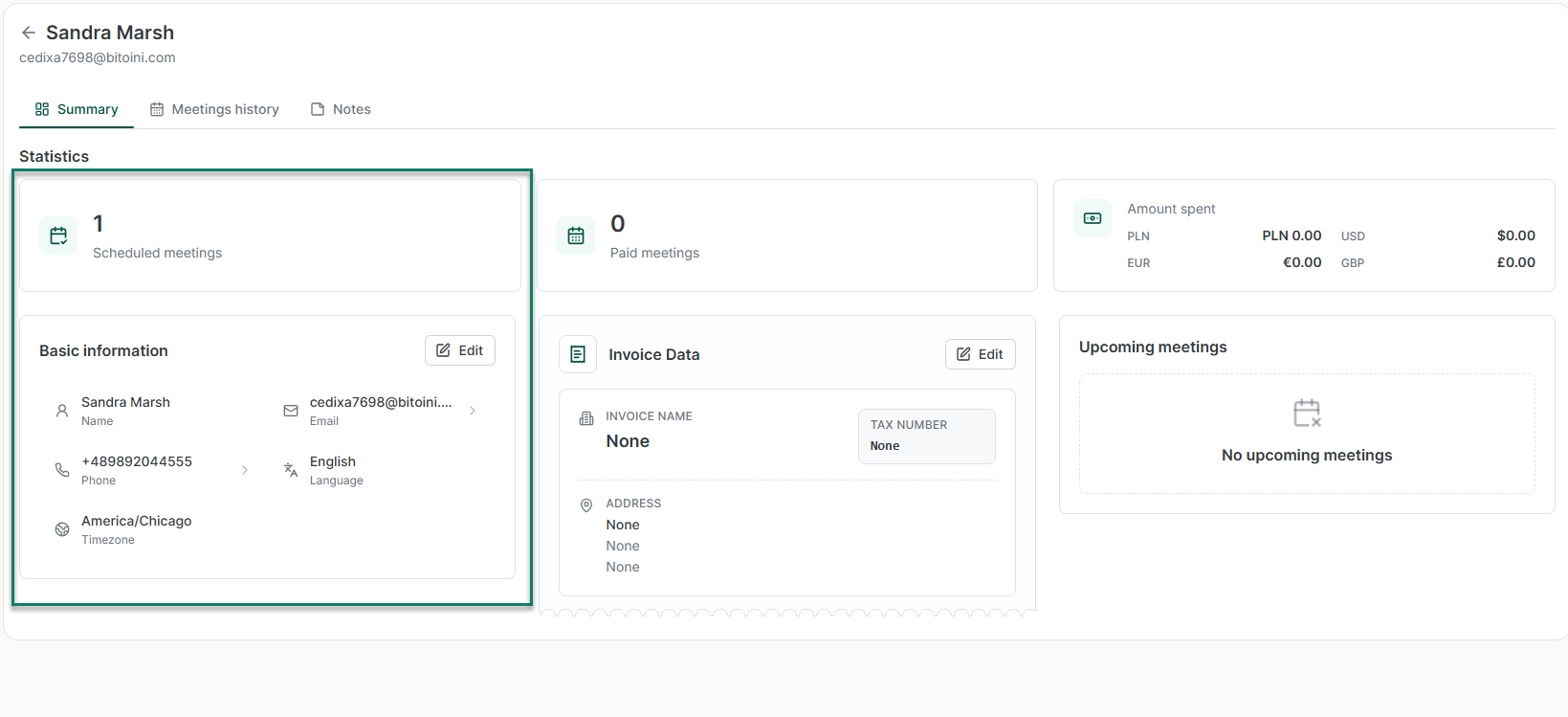
Let's see more reasons that make Zencal a top software for therapists.
Key features
1. Online appointment scheduling and automated reminders
With Zencal, you let clients book therapy sessions directly through your website or a booking link. You can set your availability, appointment duration, pricing, and booking rules.
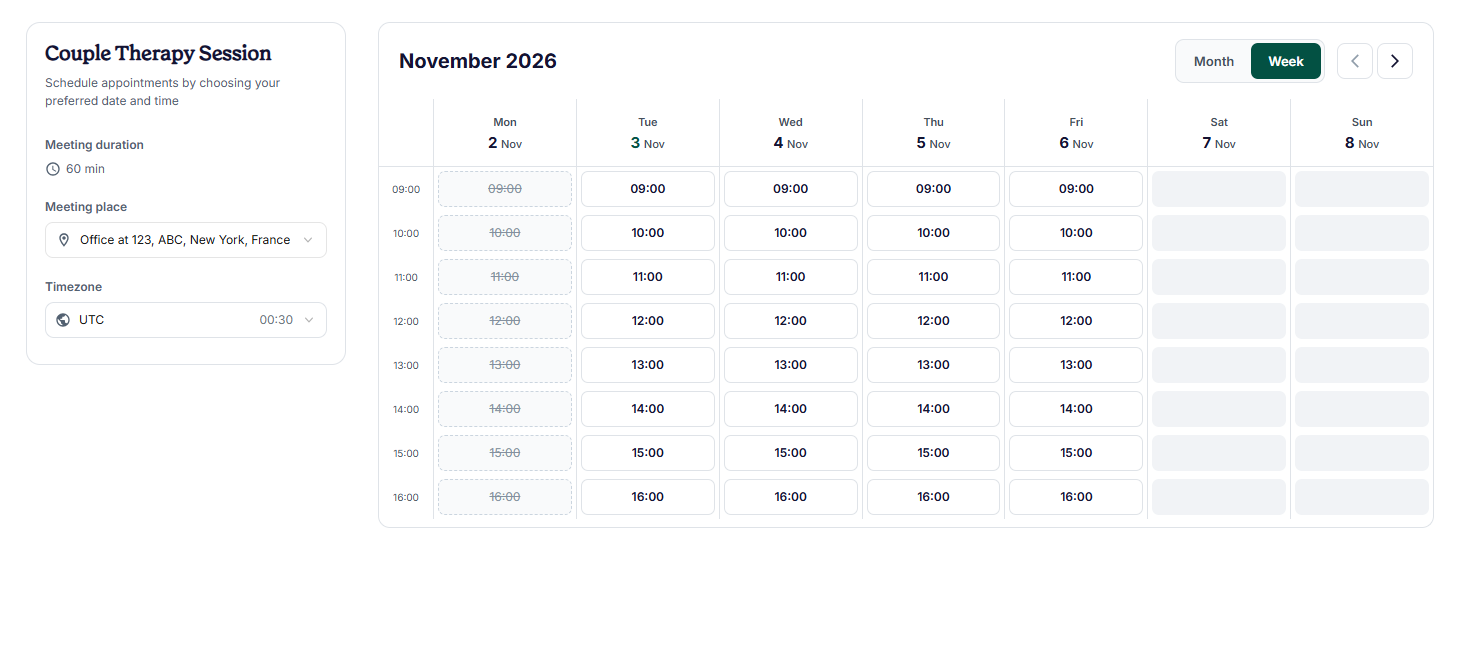
The platform then connects with Google Calendar, Outlook, and iCloud to check your availability and prevent double bookings.
For example, you can offer 50-minute individual therapy sessions and 90-minute couples sessions, each with its own schedule and price.
Once someone books an appointment, Zencal automatically updates your calendar and sends a confirmation. You can also schedule email and SMS reminders to help clients remember their appointments.
2. Online payments, session packages, and invoicing
Zencal allows therapists to collect payments when clients book their sessions. You can connect payment providers such as Stripe or PayPal and set different prices for your services.
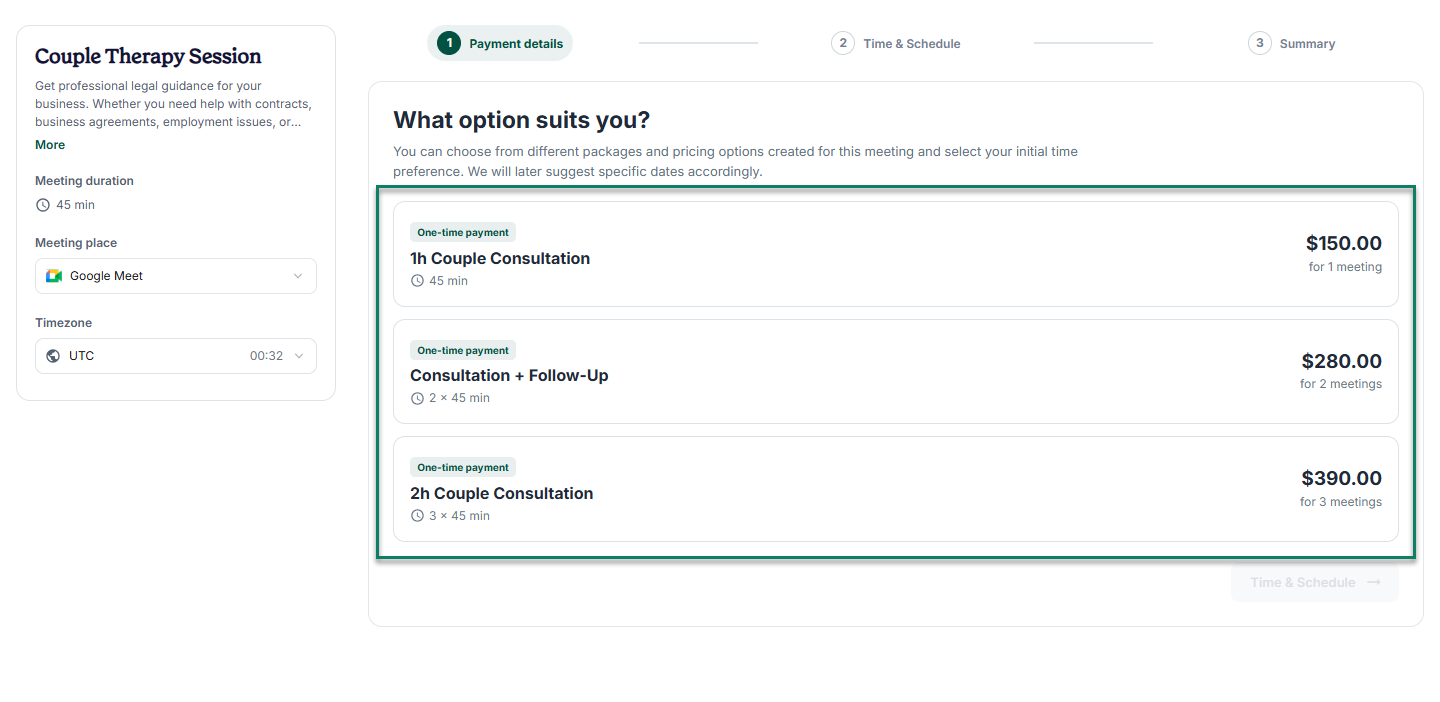
For clients who attend therapy regularly, you can sell packages of multiple sessions upfront and track how many appointments they have used.
You can also offer paid group therapy sessions, workshops, and recurring subscriptions.
3. Team scheduling and client management
Zencal also comes with team scheduling and client management. So your clinic can manage multiple therapists through a shared booking page.
Let's see how it works.
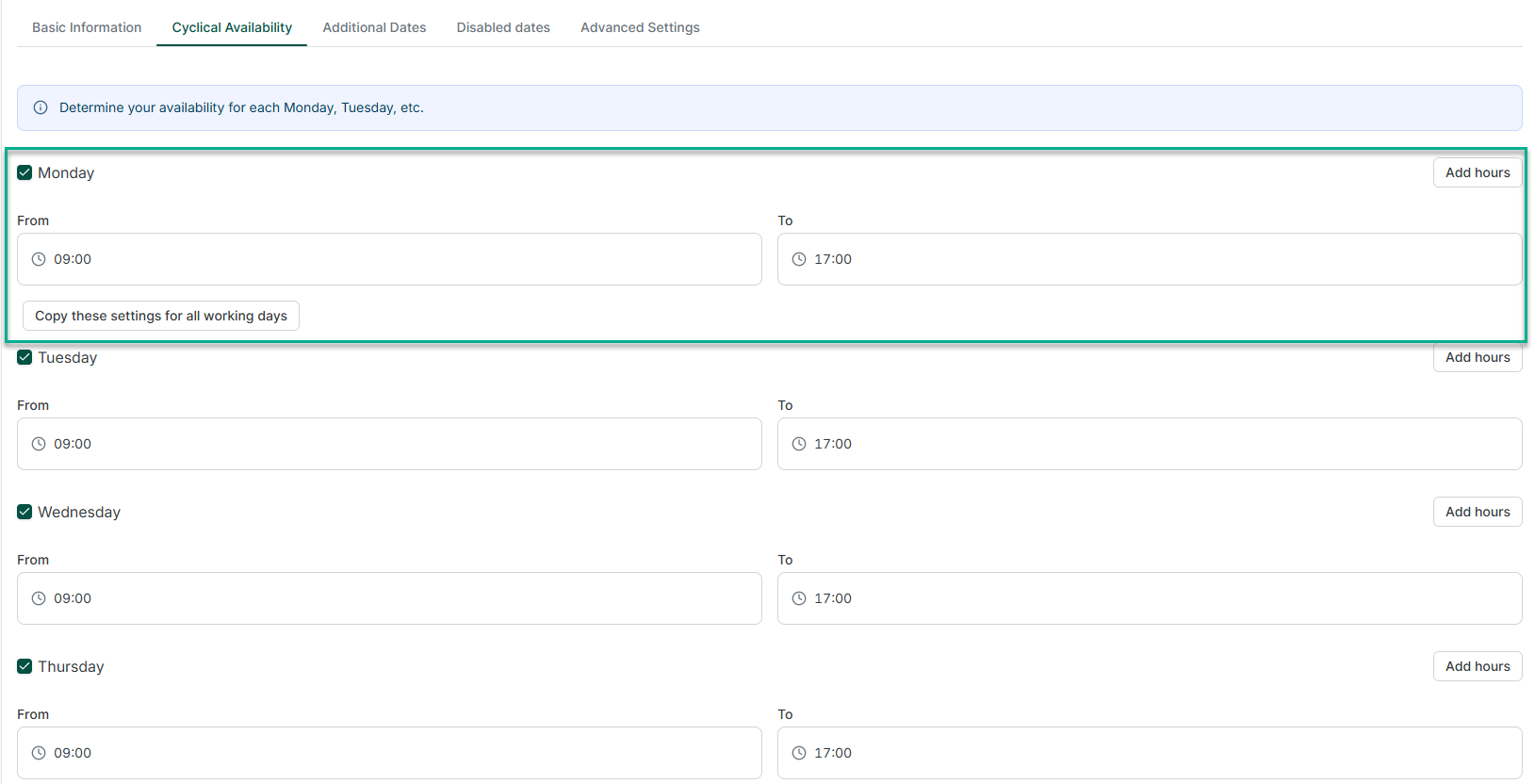
Clients can choose their preferred therapist, or you can use round-robin scheduling to distribute appointments across the team.
Each therapist can manage their availability and services, while reception staff handle appointments through separate support accounts at no extra cost.
And clients' information?
Yes, Zencal also keeps client contact details, appointment history, payments, and private notes together, making follow-ups easier.
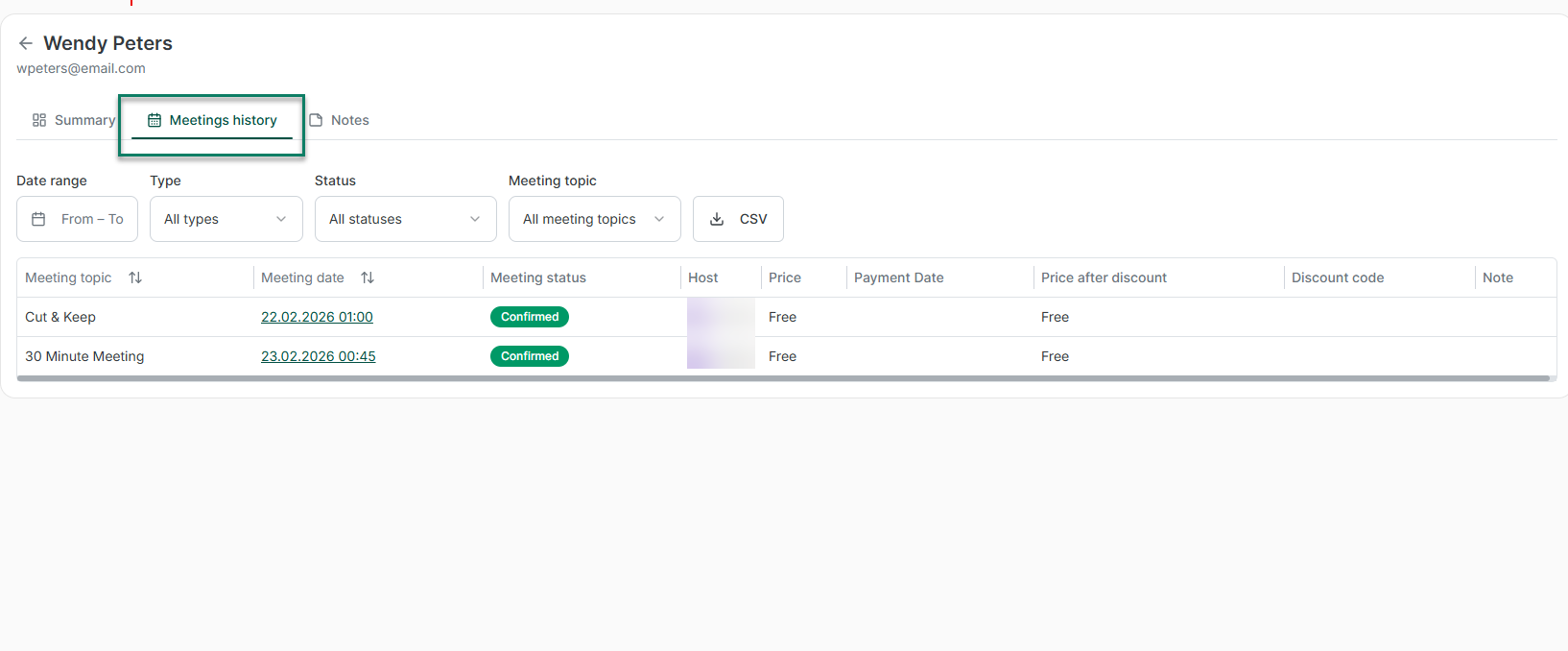
You can review booking and revenue reports to monitor your clinic's performance, identify popular services, and see how appointments spread across your team.
Pricing
- Zencal Flex: $16/month
- Zencal Pro: $28/month per professional
- Zencal Business: $275/month
- Zencal Enterprise: Custom pricing
2. SimplePractice: Best for solo therapists and small practices
SimplePractice is a therapy practice management software that helps therapists, counselors, psychologists, and mental health clinics manage their daily operations. It's one platform with appointment scheduling, client records, clinical documentation, billing, and telehealth.
For therapists who manage their own practice, SimplePractice reduces the time you spend on administrative work. You can let clients request appointments online and send intake forms before their first session.

You can also collect payments and track treatment progress without switching between multiple tools.
If you run a group practice or clinic, you can add multiple clinicians, assign administrative roles, and coordinate appointments across your team. It will help your staff manage scheduling and billing while therapists focus on their clients.
SimplePractice also supports virtual therapy through its built-in telehealth platform. You host secure video sessions, share your screen, and use an interactive whiteboard during appointments.
Key features
1. Appointment scheduling and client onboarding
SimplePractice lets you manage appointments and client intake from one calendar. You can set your working hours, choose which services clients can book, and let clients book appointments through your online Client Portal.
When someone requests a session, you review the request before approving or declining it. So you control your schedule and prevent unwanted bookings.
You can also send digital intake forms, consent documents, and questionnaires before appointments. Clients complete these documents through the Client Portal, so you can review their information before the first session.
2. Clinical documentation and treatment planning
With SimplePractice, therapists create, organize, and manage clinical records throughout a client's treatment.
You can write progress notes after each session, document diagnoses, develop treatment plans, and keep important clinical information in the client's record.
The therapy practice management software includes a library of ready-to-use templates for progress notes, assessments, treatment plans, and other clinical documents. Depending on your subscription, you can also customize templates to match your documentation process.
3. Insurance billing and payment management
This feature helps therapists manage payments from clients and insurance companies without using separate billing software.
You can create invoices, accept online payments, generate superbills, and track outstanding client balances. Clients can also log into their Client Portal to view billing documents and pay what they owe.
If your practice accepts insurance, you can submit electronic claims directly through SimplePractice. The platform supports primary and secondary claims, checks claims for potential errors, and lets you monitor their status.
Pricing
- Starter: $49/month
- Essential: $79/month
- Plus: $99/month
3. TherapyNotes: Best for clinical documentation and insurance billing
TherapyNotes is an electronic health record (EHR) and practice management software that helps therapists, counselors, psychologists, psychiatrists, and mental health clinics manage their daily operations.
It combines clinical documentation, appointment scheduling, insurance billing, and client management in one platform.

One of its biggest benefits is how it connects appointments with documentation and billing.
When you schedule a therapy session, TherapyNotes uses the appointment details to prepare the appropriate clinical note and support the billing process. So no need to enter the same information multiple times.
TherapyNotes also includes a client portal where clients can request appointments, complete intake forms, exchange secure messages, and make payments. You can also conduct virtual therapy sessions through its built-in telehealth platform.
Key features
1. Clinical documentation and treatment planning
TherapyNotes provides clinical note templates that help therapists document sessions, track treatment progress, and maintain organized client records.
You can choose from different progress note formats, including SOAP, DAP, BIRP, and Play Therapy. The software also lets you create custom progress note templates that match your practice's documentation needs.
When you write a new note, TherapyNotes can automatically pull relevant information from previous notes and treatment plans, including diagnoses and treatment objectives. This reduces repetitive data entry and helps you maintain consistent clinical records.
2. Insurance billing and claims management
TherapyNotes helps therapists and mental health clinics manage insurance billing without switching between different systems.
You can submit primary and secondary insurance claims electronically, track their status, and record insurance payments directly within the platform. This gives you a clearer picture of outstanding claims and payments.
The software also supports real-time insurance eligibility checks, allowing you to verify a client's coverage before submitting a claim. You can receive electronic remittance advice (ERA) to review how insurance companies processed your claims and record payments.
3. Appointment scheduling and client portal
TherapyNotes includes an appointment calendar that helps you organize individual sessions, recurring appointments, and clinicians' working hours.
You can set your availability, block time off, and manage appointments across multiple clinicians. The calendar also connects directly with clinical documentation and billing, so each appointment provides the information you need for subsequent tasks.
Through TherapyPortal, your clients can view available appointment times and request new sessions. They can also request cancellations or rescheduling, depending on the permissions you set.
The portal allows clients to complete intake forms, sign consent documents, exchange secure messages, and pay their bills online.
Pricing
- Solo: $69/month
- Group: $79/month for the first clinician + $50/month per additional clinician
- Enterprise: $79/month for the first clinician + $50/month per additional clinician
4. TheraNest: Best for growing therapy practices
TheraNest is an electronic health record (EHR) and practice management software that helps therapists, counselors, psychologists, and mental health clinics manage their operations. It combines appointment scheduling, clinical documentation, insurance billing, client management, and telehealth in one platform.

TheraNest works particularly well for growing practices that need to coordinate several therapists, administrators, and billing staff. You can manage multiple clinicians' schedules, assign therapy rooms, organize group sessions, and monitor appointments across different locations.
The practice management tool also helps you manage clinical records. Therapists can document sessions, create treatment plans, and track clients' progress, while administrative staff handle scheduling and billing according to their assigned roles.
As your practice grows, you can add more clinicians and manage unlimited clients without switching software.
Key features
1. Multi-clinician appointment scheduling
TheraNest provides a shared calendar that helps therapy practices coordinate appointments across multiple clinicians, rooms, and locations.
You can view everyone's availability in one place, filter appointments by therapist or location, and assign clients to available time slots. This makes it easier to manage a growing team without constantly checking individual calendars.
The software also supports recurring appointments, group therapy sessions, and room assignments. For example, if two therapists try to book the same consultation room, TheraNest prevents the scheduling conflict.
2. Customizable clinical notes and intake forms
TheraNest helps therapists manage clinical documentation, including progress notes, treatment plans, assessments, and client records.
You can create notes after each therapy session and keep important clinical information together in the client's record. The software also supports ICD-10 diagnosis codes to help you document mental health conditions.
With the Advanced and Premier plans, you can use the Dynamic Form Builder to create custom intake forms and clinical note templates.
3. Insurance billing and practice reporting
TheraNest helps growing therapy practices manage payments, insurance claims, and financial records across multiple clinicians.
You can submit insurance claims electronically, verify client eligibility, and track payments. The Advanced plan includes 50 claims and 50 eligibility checks per practice each month, while Premier offers unlimited usage under its fair usage policy.
Premier also includes automated billing. You can configure rules that let TheraNest create invoices, submit eligible claims, and record insurance payments automatically.
Your billing team can review exceptions and handle claims that need attention.
Pricing
- Essentials: $29/month per therapist
- Advanced: $59/month per therapist
- Premier: $89/month per therapist
5. Jane: Best for multidisciplinary clinics
Jane is a practice management software that helps therapists and healthcare clinics manage scheduling, clinical documentation, billing, and client communication.
It works particularly well for multidisciplinary clinics that offer several types of care under one roof. For example, a clinic might have mental health counselors, physical therapists, and massage therapists sharing reception staff and treatment rooms.

Jane helps these teams coordinate their schedules, manage client records, and collect payments from one platform.
Each practitioner can offer different services, appointment lengths, and working hours. Clients can book appointments online, complete intake forms, and attend virtual sessions through Jane's built-in telehealth platform.
You can also manage multiple clinic locations, assign staff permissions, and track financial activity across your practice.
Key features
1. Appointment scheduling and clinic coordination
Jane provides a shared calendar that helps you manage appointments across multiple practitioners and clinic locations.
You can set each therapist's availability, create different appointment types, and allow clients to book sessions online. The software supports individual appointments, group sessions, and classes.
You can also send automated appointment reminders and manage waiting lists when clients cancel their sessions.
2. Customizable clinical documentation
Jane lets therapists create clinical notes, treatment plans, intake forms, and other documents directly within each client's record.
You can use SOAP notes, narrative formats, or customizable templates that match your clinical approach. This flexibility helps multidisciplinary clinics maintain different documentation processes for different services.
The software also supports outcome measurement surveys, allowing you to monitor clients' progress throughout treatment. If your clinic has supervisors, you can set up workflows that let them review, comment on, and co-sign clinical notes.
3. Billing, payments, and insurance management
Jane helps clinics manage invoices, payments, and financial records across different practitioners and services.
You can create invoices, issue receipts, accept online or in-person payments, and send payment requests to clients with outstanding balances.
The software also supports treatment packages, gift cards, and recurring memberships, although some options require the Thrive plan.
Additional therapy practice management tools worth checking
6. Sessions Health: Best for budget-conscious solo therapists and small practices.
7. TherapyAppointment: Best for therapists who want pricing based on monthly session volume.
8. TheraPlatform: Best for interactive teletherapy sessions and online treatment activities.
9. ICANotes: Best for detailed clinical documentation and psychiatric practices.
10. Valant: Best for larger behavioral health practices that need outcome tracking.
11. Carepatron: Best for therapists who want free practice management software with AI-assisted notes.
12. PracticeQ: Best for customizable intake forms and automated client onboarding.
13. CounSol: Best for online counseling practices that need secure client communication.
14. Zanda: Best for managing therapists across multiple clinic locations.
15. Cliniko: Best for simple scheduling and client management in allied health clinics.
16. Owl Practice: Best for Canadian therapy practices and couples or family billing.
17. BestNotes: Best for addiction treatment centers and behavioral health programs.
18. Halaxy: Best for multidisciplinary practices that want free core practice management tools.
19. Therasoft: Best for therapists who need integrated insurance verification and claims management.
20. EHRYourWay: Best for behavioral health organizations that need customizable clinical workflows.
What is therapy practice management software?
Therapy practice management software helps therapists, counselors, psychologists, and mental health clinics manage their daily operations from one platform. It comes with essential tools for appointment scheduling, client management, clinical documentation, billing, and payments.
For example, therapists can use it to schedule sessions, maintain client records, and create treatment plans. They can also process insurance claims and track payments.
Many platforms also offer telehealth, where therapists can host virtual sessions with clients.
For group practices, the software helps many therapists coordinate appointments. They share administrative responsibilities and manage client information while protecting sensitive clinical records.
How to choose the right therapy practice management software
To choose a good therapy practice management software:
- Identify your practice's needs
- Check scheduling and client management features
- Evaluate clinical documentation and billing tools
- Review security, privacy, and compliance
Let's discuss each point in more detail.
1. Identify your practice's needs
Start by listing the tasks you handle every week, from booking new clients to writing notes and collecting payments.
Let's say you are a solo therapist. You may need a simple calendar, secure records, and online payments. That can be enough
But it's different for a clinic. A clinic with many therapists will need shared schedules, staff permissions, supervision workflows, and insurance billing.
You should also consider the clients you serve. For example, child therapists may need intake forms that parents can complete. But telehealth providers need reliable video sessions.
Now that you know your needs, here's the next step when choosing a therapy practice management platform.
2. Check scheduling and client management features
Don't choose a calendar just because it looks simple.
Instead, check whether clients can book appointments, reschedule sessions, complete intake forms, and receive reminders without calling your office, as Zencal lets you do.
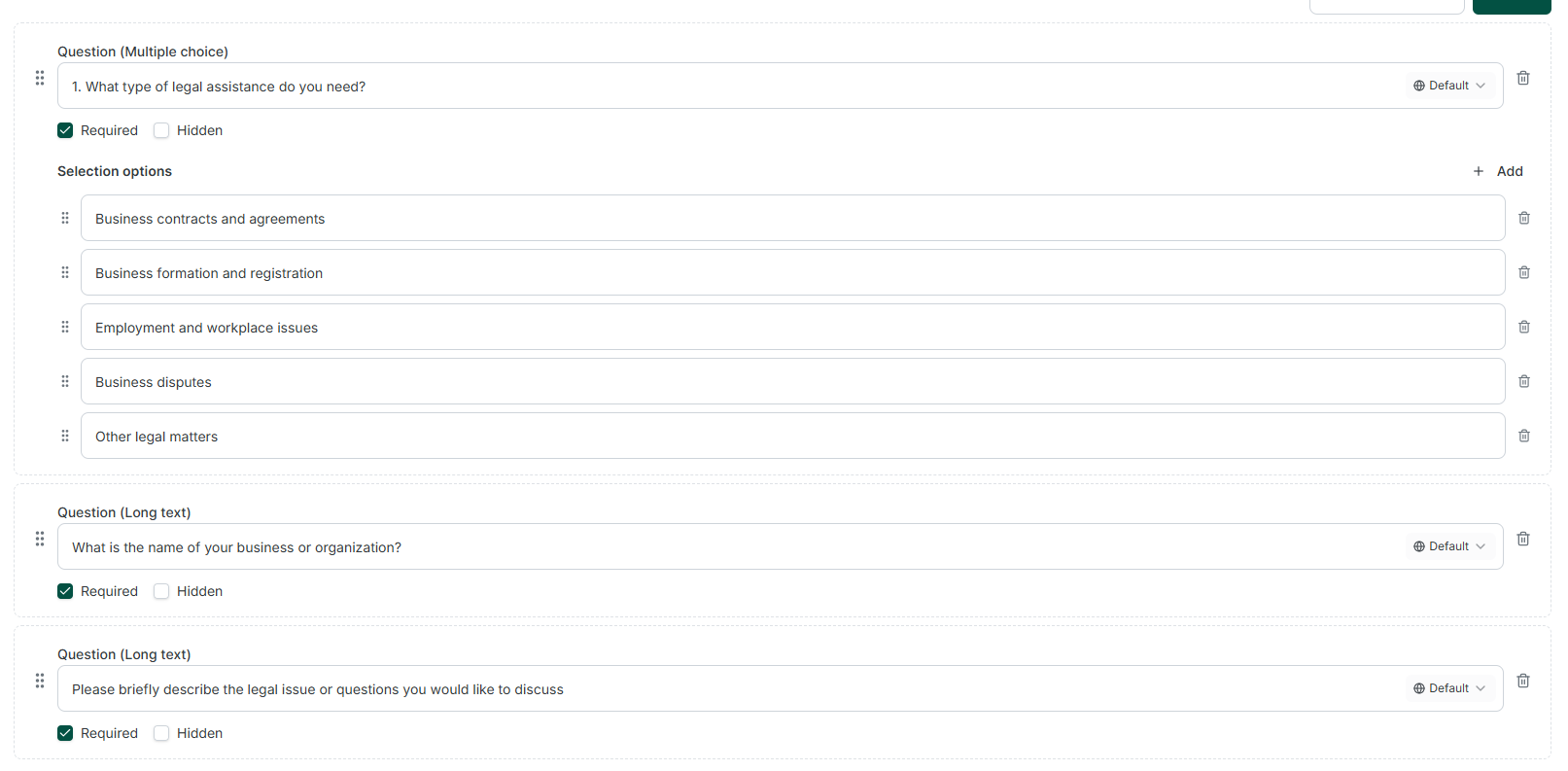
If many clinicians share a location, see whether the software can prevent double bookings for therapy rooms.
Here are the other features I recommend checking:
- Recurring appointments,
- Waitlists,
- Cancellation rules, and
- Availability buffers between sessions.
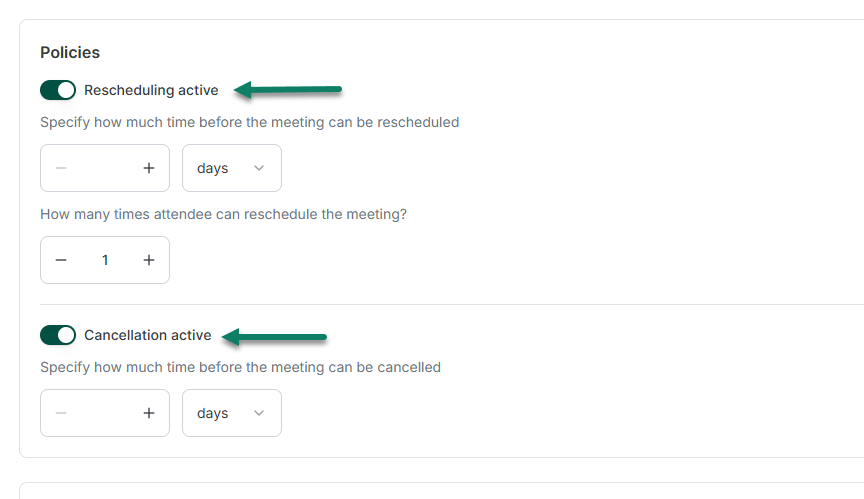
These are the basic features a good scheduling software for therapists should have.
Another thing you can check is the client portal. Can clients upload documents, update contact details, and pay invoices?
These small details I just shared will make or break your workflow. A missed reminder or incomplete intake form can create extra work for you before a session even begins.
Let's see what to do next.
3. Evaluate clinical documentation and billing tools
Try writing a sample progress note during the software demo. Does the platform support your preferred format, let you update treatment plans, and flag unsigned notes?
Then test the billing workflow. Create an invoice, submit an insurance claim, and track a rejection.
According to the 2024 CAQH Index, healthcare providers spent an average of $6.33 to submit a claim manually, compared with $3.05 electronically.
That's $3.28 less per claim, or $328 for every 100 claims. As your practice grows, these potential savings can add up.
So check whether the software connects completed appointments to notes and claims, too. Otherwise, you may end up typing the same client details many times.
4. Review security, privacy, and compliance
Therapy records contain highly personal information, so check security before choosing software.
According to IBM's 2025 report, healthcare data breaches cost organizations an average of $7.42 million.

Your clinic might never face a bill that large, but even a smaller breach could interrupt sessions, expose confidential records, and damage clients' trust.
For example, hackers breached Connecticut's Community Health Center in 2024, affecting over one million people.
So security is crucial. Ask vendors about encryption, multi-factor authentication, access controls, and backups. For US practices, confirm they sign a HIPAA business associate agreement.
Let's discuss one more thing to check before choosing therapy practice software.
5. Compare pricing and test the software
Therapy practice management software costs approximately $70 per month on average, although prices vary by provider, features, and practice size.
So check the full monthly cost before comparing plans. A low starting price can grow once you add clinicians, insurance claims, payment processing, text reminders, or telehealth.
Also, ask what happens to your bill when you hire another therapist.
Then use a trial to complete a normal week of tasks: book a client, send intake forms, write a note, collect a payment, and run a report.
I also recommend inviting your receptionist or billing assistant to test the parts they will use. Finally, check support response times and how easily you can export client records if you leave.
Choose the best therapy practice management tool
The right therapy practice management software can make your daily work easier, whether you see clients alone or manage a busy clinic.
However, the best option depends on your practice's size, budget, and daily needs.
If you are a solo therapist, you may prioritize simple scheduling and affordable pricing, while a growing clinic might need advanced billing, team management, and reporting tools.
And Zencal is perfect for both solo therapists and clinics that want to simplify appointment scheduling, manage clients, and collect payments online.
Ready to make running your therapy practice easier? Start your free trial with Zencal and see how it can help.

Software developer with over 10 years of experience, founder of Zencal.io. With a deep passion for marketing and automation, he is on a mission to build something truly useful.