
Running a service business takes more work when you have to manage bookings, payments, reminders, and client details. That is where Zencal can help.
The main problems Zencal solves come from the repetitive work around managing clients and appointments. In this guide, we look at those problems and explain how Zencal helps you handle them more easily.
Problem #1. Too much back-and-forth when scheduling appointments
Issue:
Scheduling can waste a surprising amount of time.
A potential client asks when you are free. You send a few options. They reply hours later, but one of those times no longer works. You send another list, and the conversation continues.
Solution:
Zencal removes most of this back-and-forth with online booking.
You set your working hours, meeting duration, breaks, and other booking rules. Zencal then shows clients the times they can actually book. The client chooses a suitable time and confirms the appointment without contacting you first.
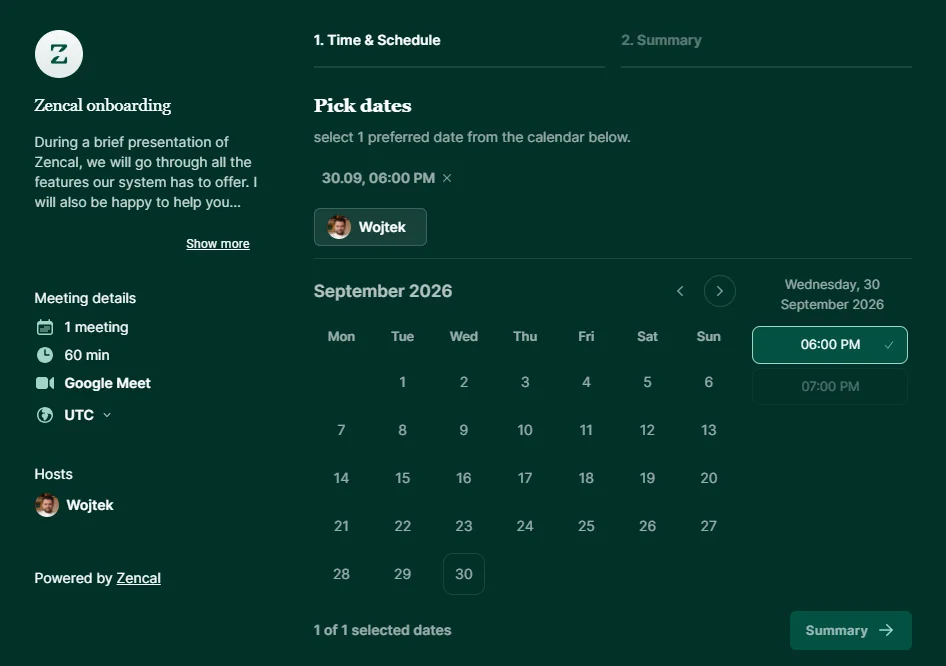
You can share your booking link through your website, email signature, social media, or direct messages.
Zencal also checks your connected calendars before it displays available times. This helps you avoid offering a time when you already have another commitment. It also handles time-zone conversion when you work with clients in different countries.
This removes a lot of repetitive admin work for consultants, coaches, therapists, accountants, and other professionals who schedule several meetings every week.
Problem #2. Double bookings and messy calendars
Issue:
Using many calendars can quickly create problems.
You may keep client appointments in one calendar, personal commitments in another, and team meetings somewhere else. If your booking tool does not know about all of them, a client could book a time you already planned to use.
Solution:
Zencal connects with Google Calendar, Outlook, and Apple calendars. It checks your calendar before offering appointment times and adds new bookings to your schedule.
This creates one booking process without forcing you to stop using the calendar you already rely on.
You can also set buffers around appointments. If you need 15 minutes after every consultation to write notes, you can keep that time unavailable.
This solves a calendar problem for service businesses. It also protects your working day from becoming a series of meetings packed too closely together.
Problem #3. Clients book appointments but forget to pay
Issue:
A booking does not always mean a sale.
If you use one tool for scheduling and another for payments, a client can reserve your time and then forget to pay. You may need to send an invoice, follow up, check your bank account, and match the payment to the correct appointment.
Solution:
Zencal connects the appointment and payment in one checkout.
You create a paid service, set the price and availability, and share the booking page. The client chooses a time and pays as part of the booking process.
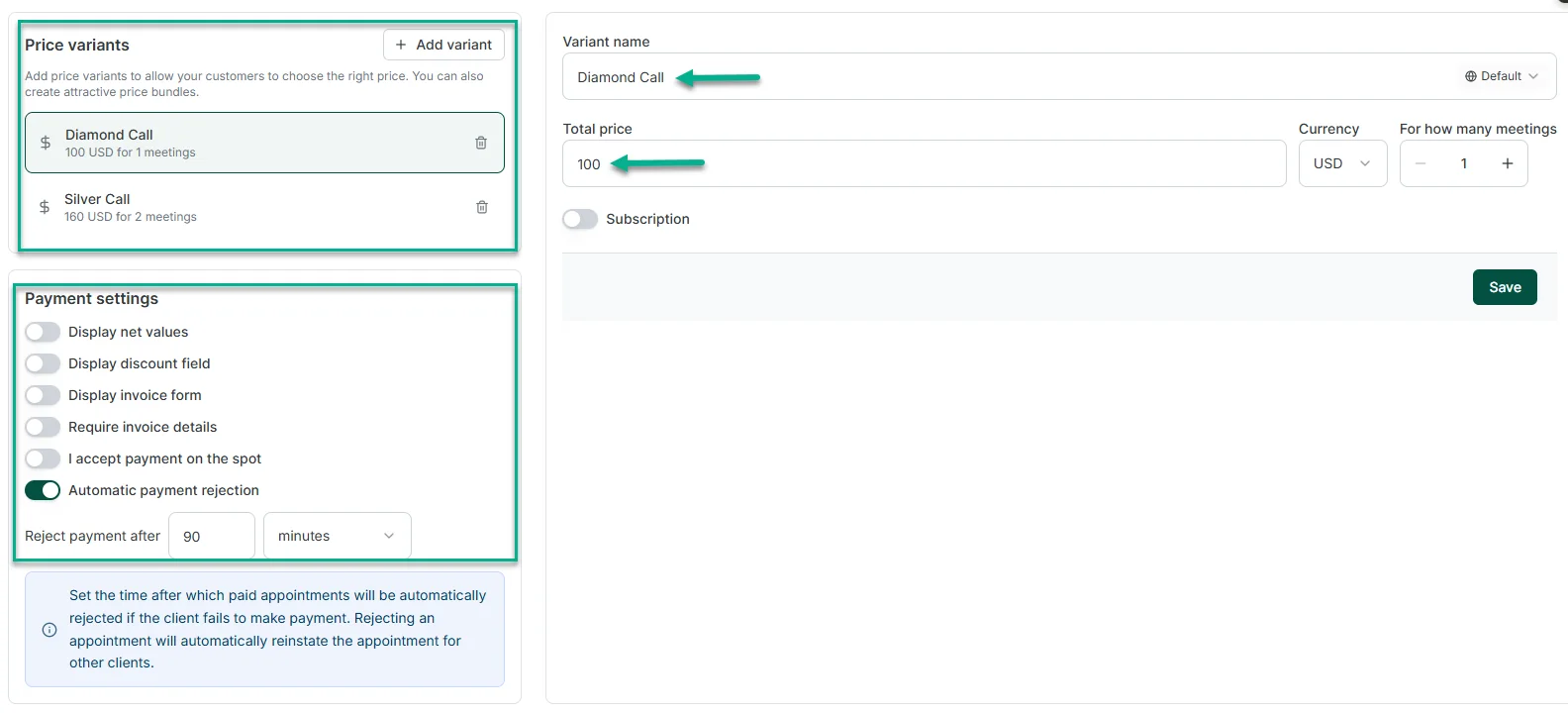
Zencal then keeps the appointment, payment status, and client details together.
This setup works particularly well when you sell consultations, coaching sessions, lessons, therapy sessions, or other services that clients can purchase individually.
Problem #4. Clients forget appointments or arrive unprepared
Issue:
Even clients who intend to attend can forget an appointment they booked several days ago. Others remember the appointment but forget the meeting link, address, or instructions you sent them.
Solution:
You can solve part of this problem with Zencal's automated Scenarios.
Scenarios let you send email and SMS messages based on what happens during the client journey. You can send a confirmation after someone books, a reminder before the meeting, and another message after the appointment.
You choose the timing and message once, then Zencal sends it when the relevant event occurs.
You can also include practical information in these messages. For example, you could remind a consulting client to prepare certain documents before the call or send an online meeting link shortly before the appointment.
That reduces the number of messages your team needs to send manually and gives clients fewer reasons to miss or arrive unprepared for a session.
Problem #5. Client information ends up in too many places
Issue:
A calendar can tell you that Sarah booked a consultation last Tuesday. It usually cannot tell you much about your full relationship with Sarah.
You may need to search emails for previous conversations, check your payment provider for transactions, open a spreadsheet for client notes, and inspect your calendar for appointment history.
That becomes difficult as your client list grows.
Solution:
Zencal gives each client a profile that connects contact details, appointments, payments, activity, and private notes.
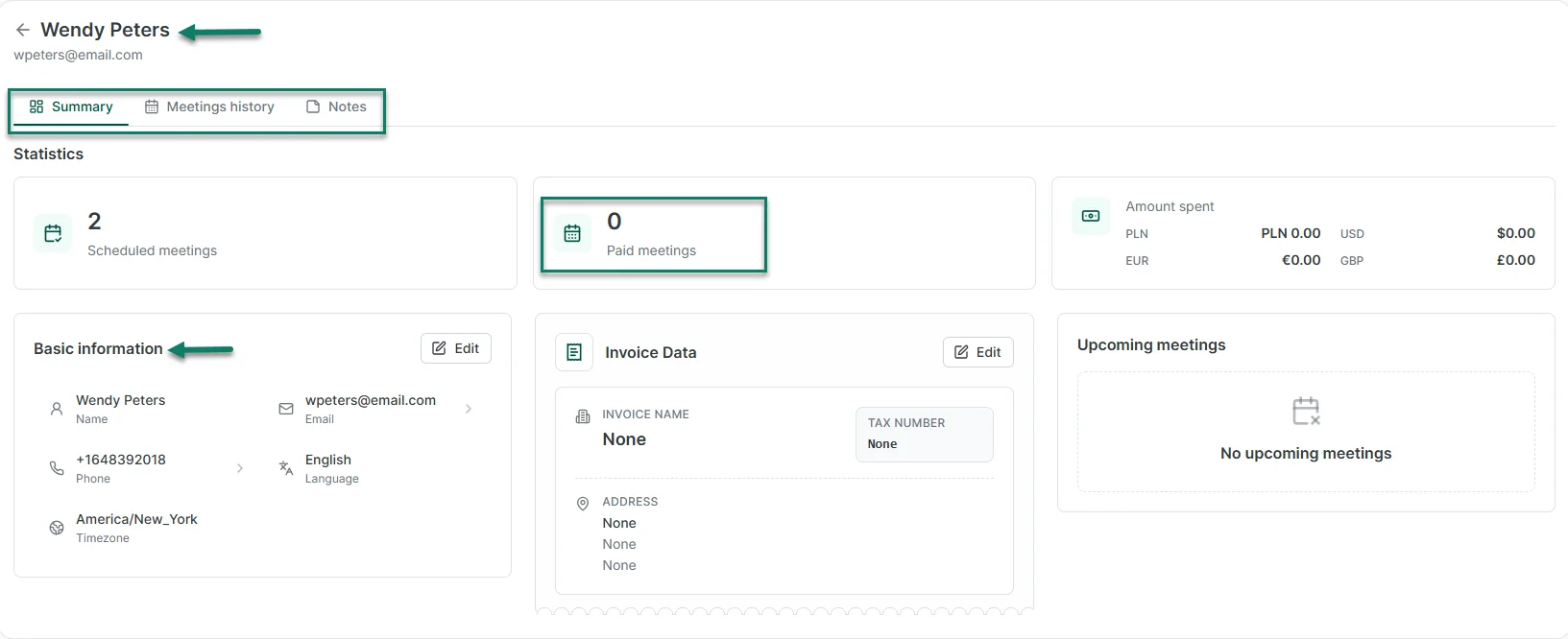
New bookings can add information to the same client record. You can also import an existing client database instead of starting from scratch.
This gives you more context before your next conversation with a client.
For example, you can check what service the client previously purchased, when they last met with you, and what notes your team added.
You do not need to rebuild that context from several different tools every time the client returns.
Problem #6. Selling multi-session services creates extra admin work
Issue:
Many service businesses do not produce the full result in one session.
A coach may work with a client for eight sessions. A therapist may recommend a longer series of appointments. A consultant may sell a three-month program.
If clients buy each appointment separately, both sides repeat the same process again and again.
Solution:
Zencal lets you sell service bundles instead.
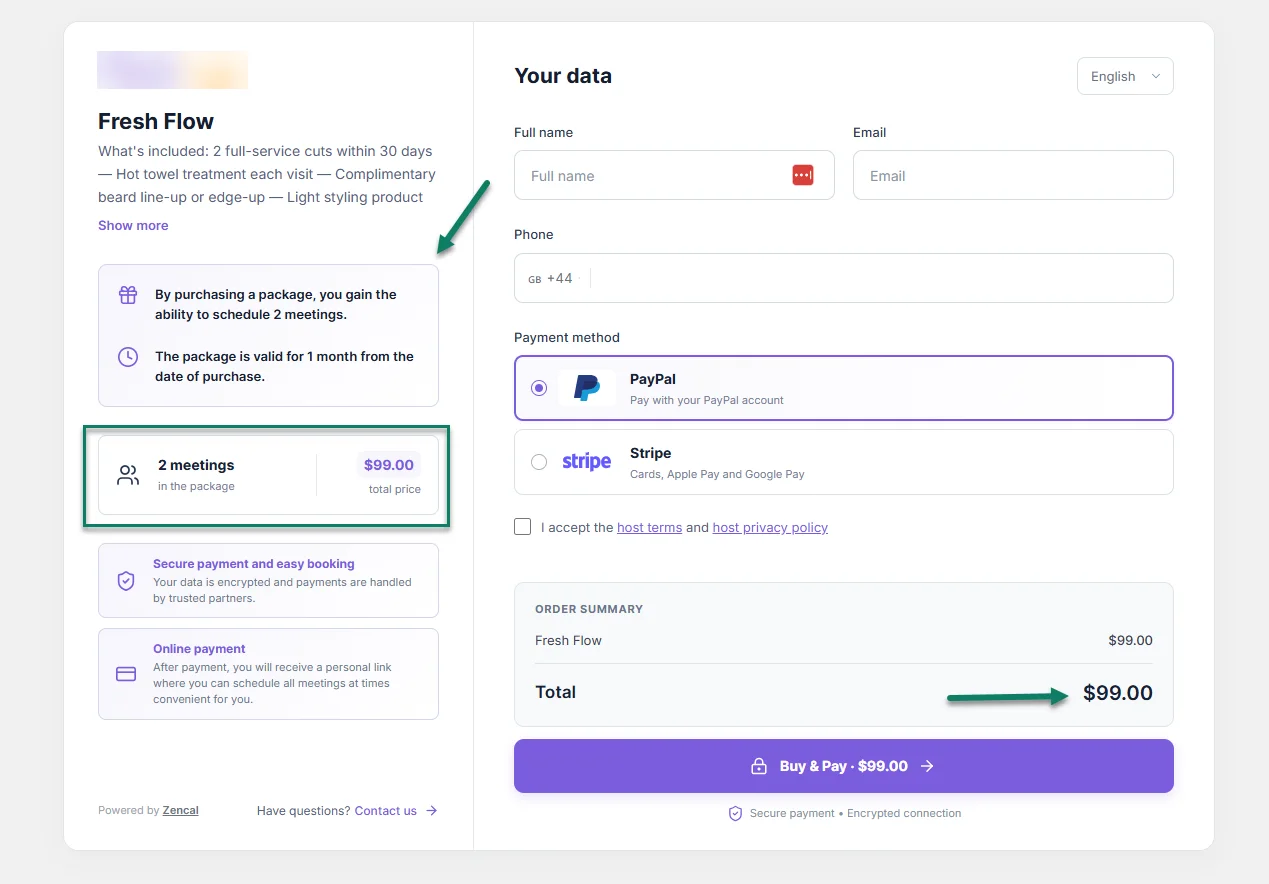
You choose the number of appointments in the bundle, the total price, which services the client can book, and how long the bundle remains valid.
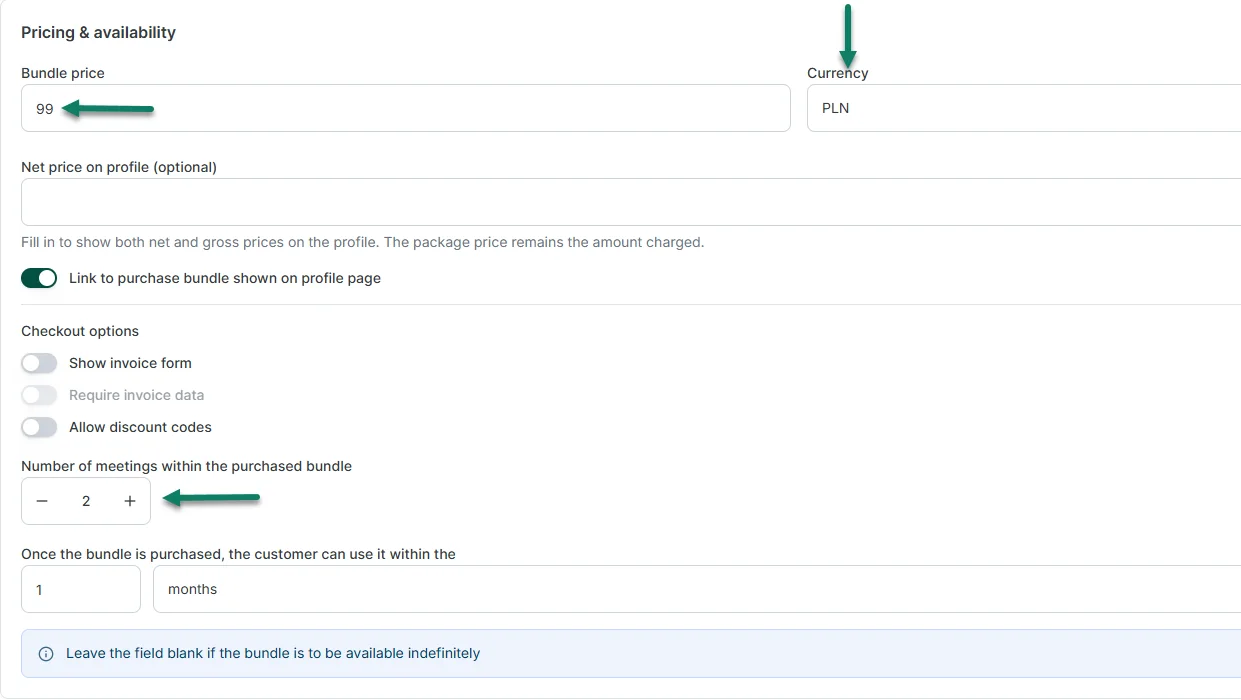
The client purchases the bundle once and gets a private booking link. Zencal then keeps track of how many sessions the client uses and how many remain.
This solves two problems at once.
The client does not need to make a new purchase before every appointment, and you do not need to maintain your own spreadsheet showing how many sessions each person has left.
Bundles can also help you sell the full service you believe a client needs instead of selling your expertise one hour at a time.
Problem #7. Recurring clients have to book and pay again every month
Issue:
Bundles work well when you sell a fixed number of sessions, but some client relationships continue indefinitely.
Think about weekly tutoring, monthly consulting, recurring coaching, therapy, or membership-style services.
Without automation, you may need to collect another payment and arrange another appointment every billing period.
Solution:
Zencal supports recurring subscriptions for these services.
You set the service, price, billing interval, and available recurring times. The client chooses a fixed weekly or monthly appointment slot and authorizes payment through Stripe.
Zencal then creates the recurring appointment schedule and charges the client according to the subscription rules.
This can give the client a consistent place in your calendar while reducing the work you spend on renewals and repeated bookings.
It can also make revenue easier to plan because you know which clients have ongoing subscriptions instead of relying entirely on one-time appointments.
Problem #8. A growing team makes scheduling harder
Issue:
Scheduling becomes more complicated when several people deliver the same service.
Now you need to know who works when, who can provide each service, which specialist the client wants, and how you should distribute new appointments.
Someone may end up managing all of this manually.
Solution:
Zencal's team scheduling features let each specialist keep their own calendar and availability while the business uses one client-facing booking system.
You can let clients choose a particular specialist. You can also let Zencal assign appointments according to availability and your routing rules.
Zencal supports round-robin appointment distribution as well.
This helps clinics, consultancies, agencies, and other multi-specialist businesses avoid the endless question of "Who can take this client?"
Your team members can keep their individual schedules while clients get a much simpler booking experience.
Problem #9. Workshops and group events require too many separate tools
Issue:
A one-to-one appointment and a 30-person workshop need different booking processes.
For an event, you may need to manage capacity, registrations, payments, attendee details, confirmations, and reminders.
Many businesses solve this by combining a form, payment tool, spreadsheet, email platform, and calendar.
Zencal includes an Events module for webinars, workshops, courses, training sessions, and other group services.
You can set the date, capacity, price, location, and attendee information you want to collect. Clients can register and pay through the same process.
Zencal also tracks registrations and supports confirmations and reminders.
That means you can manage your one-to-one services and group offers inside the same broader client system instead of creating a completely separate workflow whenever you run an event.
Problem #10. Owners struggle to see what actually drives revenue
Issue:
A busy calendar can look impressive without telling you much about business performance.
- Which service earns the most revenue?
- Which specialist sells the most?
- Which marketing campaign brings clients who actually buy?
- Where do potential customers leave the checkout process?
You need more than appointment counts to answer those questions.
Solution:
Zencal's analytics connect bookings with sales, revenue, team performance, marketing sources, traffic, and checkout conversion.
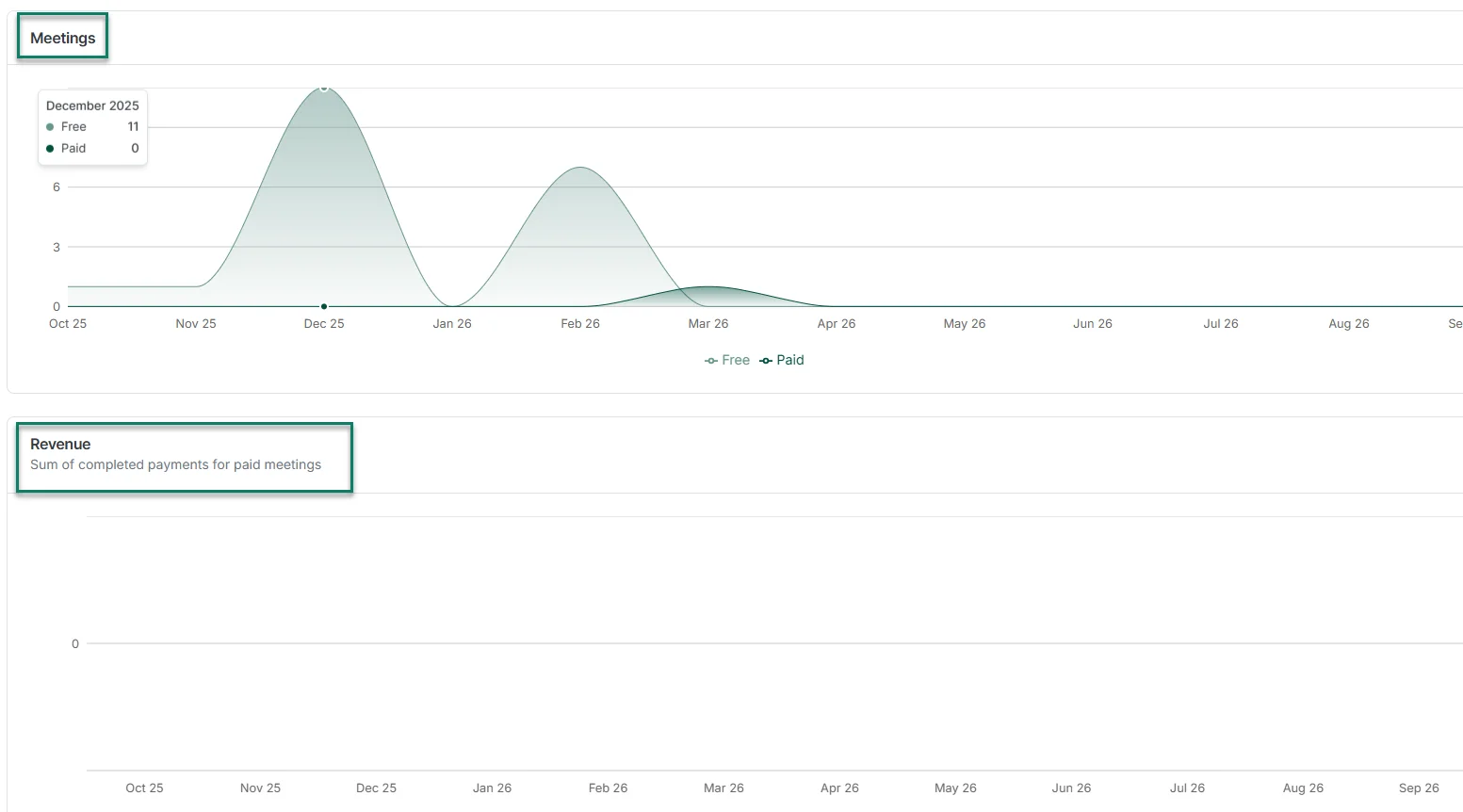
This gives owners and managers a clearer picture of what happens across the business.
For example, you might discover that one service gets fewer bookings but produces much more revenue. You could see that one marketing channel brings plenty of visitors but very few purchases. A team manager could compare specialists and identify differences in sales performance.
Without connected data, you may need to collect numbers from your calendar, payment provider, analytics platform, and spreadsheets before you can answer basic questions.
Zencal brings more of that information together.
Solve your business problems with Zencal
The biggest problems Zencal solves are the ones that take up your time every day.
You can reduce scheduling back-and-forth, collect payments with bookings, send reminders automatically, and track recurring services from one place.
It means fewer manual tasks and fewer chances for something to slip through the cracks. If these problems sound familiar, start a free Zencal trial and see how it fits your workflow.