
If you're considering Zencal, you probably have a few questions before getting started. This Zencal FAQ covers the things customers ask us most, from scheduling and payments to integrations, pricing, security, and client management.
We've kept the answers simple and practical so you can quickly understand how Zencal works and whether it fits the way you run your business.
Keep reading.
Zencal basics
What is Zencal?
Zencal is an online scheduling and service sales platform for professionals and service businesses. You can use it to let clients book appointments, collect payments, sell service bundles, and run paid events.
Let's take the appointment booking feature for instance. You set your working hours, connect your existing calendars, create the services people can book, and share a booking link.
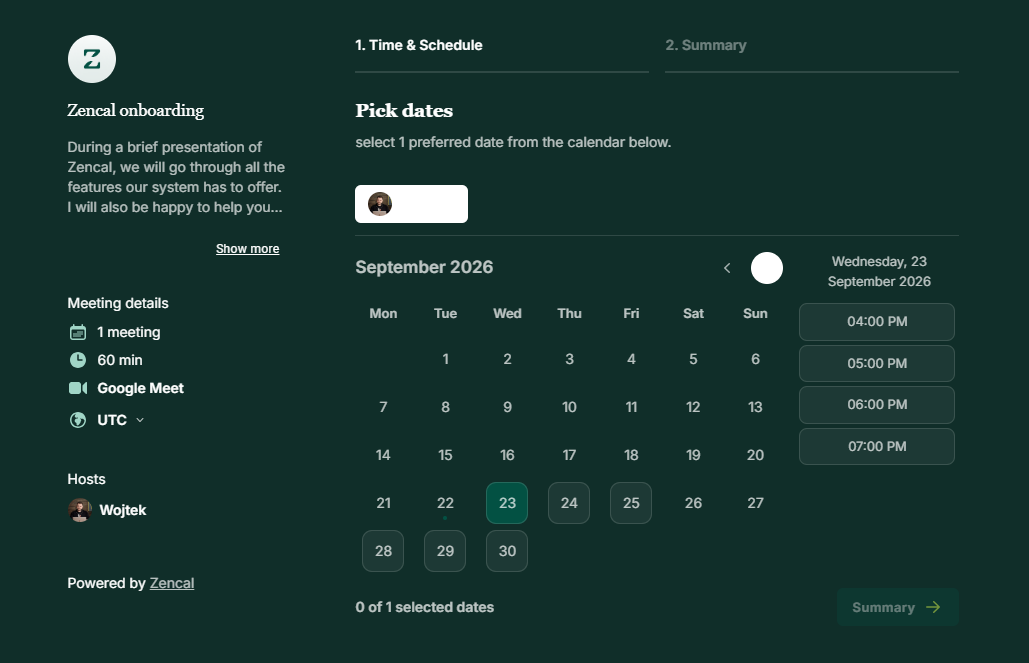
Where Zencal goes further is what happens around that appointment. You can connect the booking with payment, invoices, client records, reminders, subscriptions, team scheduling, and other parts of your workflow.
Who is Zencal designed for?
Zencal is mainly built for businesses that sell their time, expertise, appointments, or other bookable services.
Our users include consultants, coaches, psychologists, therapists, accountants, lawyers, financial advisors, tutors, personal trainers, dietitians, physiotherapists, real estate professionals, and similar businesses.
Zencal can work for an individual professional, but it also has features for larger service teams. For example, an online clinic can create one booking process while maintaining separate schedules for each specialist.
Is Zencal only an appointment scheduling tool?
No. Scheduling is a major part of Zencal, but the platform mainly helps businesses or service providers sell and deliver services.
You can accept payments, sell subscriptions, offer bundles of appointments, organize events, manage client records, automate emails and SMS reminders, collect reviews, and track business performance.
https://www.youtube.com/watch?v=oTPHWcNC7Nc
Can I use Zencal for free consultations as well as paid services?
Yes. You can use Zencal's Smart Booking feature for free consultations, discovery calls, introductory meetings, and other appointments that don't require a payment.
You choose the appointment duration, availability, location, booking limits, and other rules. You can then send the booking link directly to a prospect or place it on your website, in an email signature, or inside a campaign.
For services that require payment, you can create a paid appointment instead.
Scheduling and calendar questions
Which calendars does Zencal integrate with?
Zencal currently connects with:
- Google Calendar
- Microsoft Outlook
- iCloud Calendar
You do not have to abandon the calendar you already use.
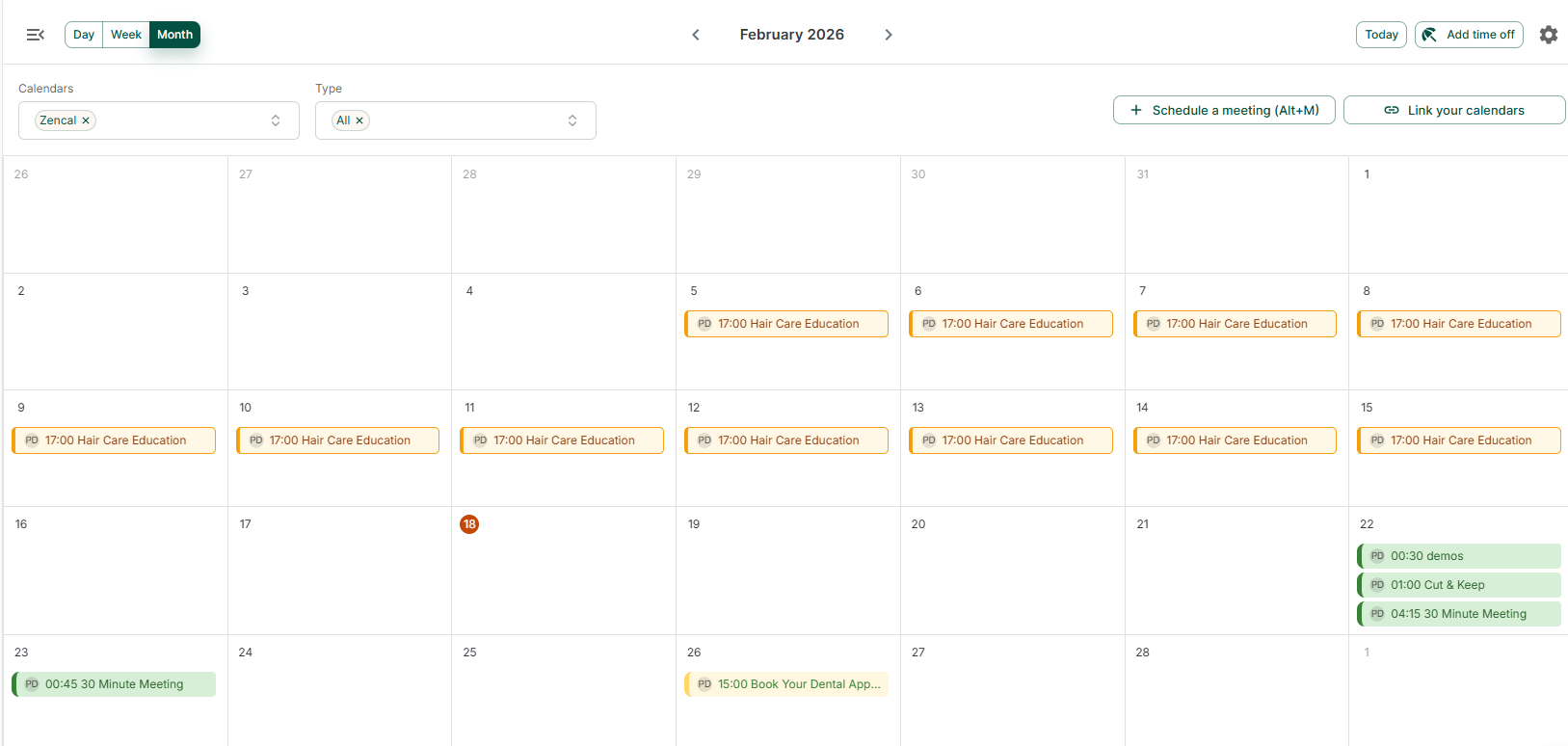
When a client books an appointment, Zencal will automatically display the event on your connected calendar. Of course, Zencal also comes with a beautiful built-in calendar.
Can I connect more than one calendar?
Yes. Zencal works with people who may have many calendars. For example, you may store your work meetings in Google Calendar and personal appointments in iCloud Calendar.
After connecting both calendars, Zencal will regularly review them before deciding whether a time is actually available.
Does Zencal prevent double bookings?
Yes, provided you have connected the calendars that contain the events Zencal needs to consider.
Existing events can block those periods from your Zencal availability. A client should therefore only see appointment times that remain free after your connected calendars and availability rules have been checked.
Can I decide exactly when clients are allowed to book?
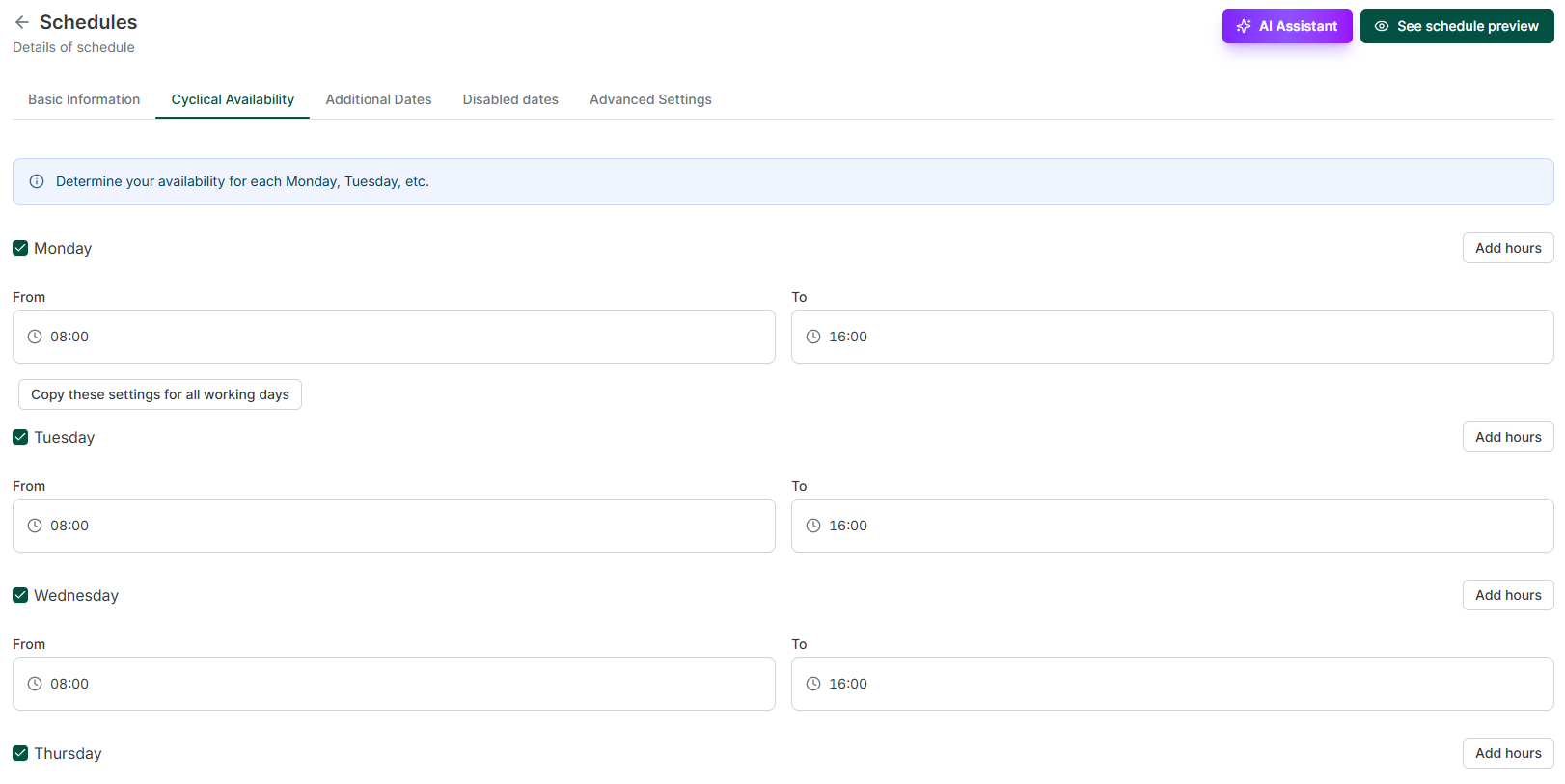
Absolutely. You choose the days and hours during which clients can book you. It's called a schedule.
You can use one schedule across many services or create different schedules for different appointment types. For example, you might offer online meetings on weekdays but in-person consultations only on Tuesdays and Thursdays.
You can also add exceptions, extra available hours, and breaks between appointments.
Can I add breaks between appointments?
Of course. Zencal lets you set a break between meetings. If your service lasts 60 minutes and you want 15 minutes afterward for notes or preparation, Zencal will include that buffer when calculating your available slots.
You can also use different availability schedules when different services need different working hours.
Can clients cancel or reschedule their own appointments?
Yes. After booking an appointment, clients receive links that allow them to cancel or reschedule without contacting you. But you decide the rules.
You can specify how close to an appointment someone is still allowed to cancel or reschedule and limit how many changes are permitted. For example, you can ask Zencal to reject cancelations if there is only 1 hour remaining before the appointment.
Can I manually schedule an appointment for a client?
Yes, you do not have to make every client use your public booking page. From Zencal's calendar, you can create an appointment yourself, select the client and service, and choose a date.
You can also schedule recurring appointments this way. If the service requires payment, you can send the client a payment link by email. The reservation can then be confirmed after payment.
Can I create different types of appointments?
Yes, and Zencal does not currently limit the number of appointment types based on your subscription plan.
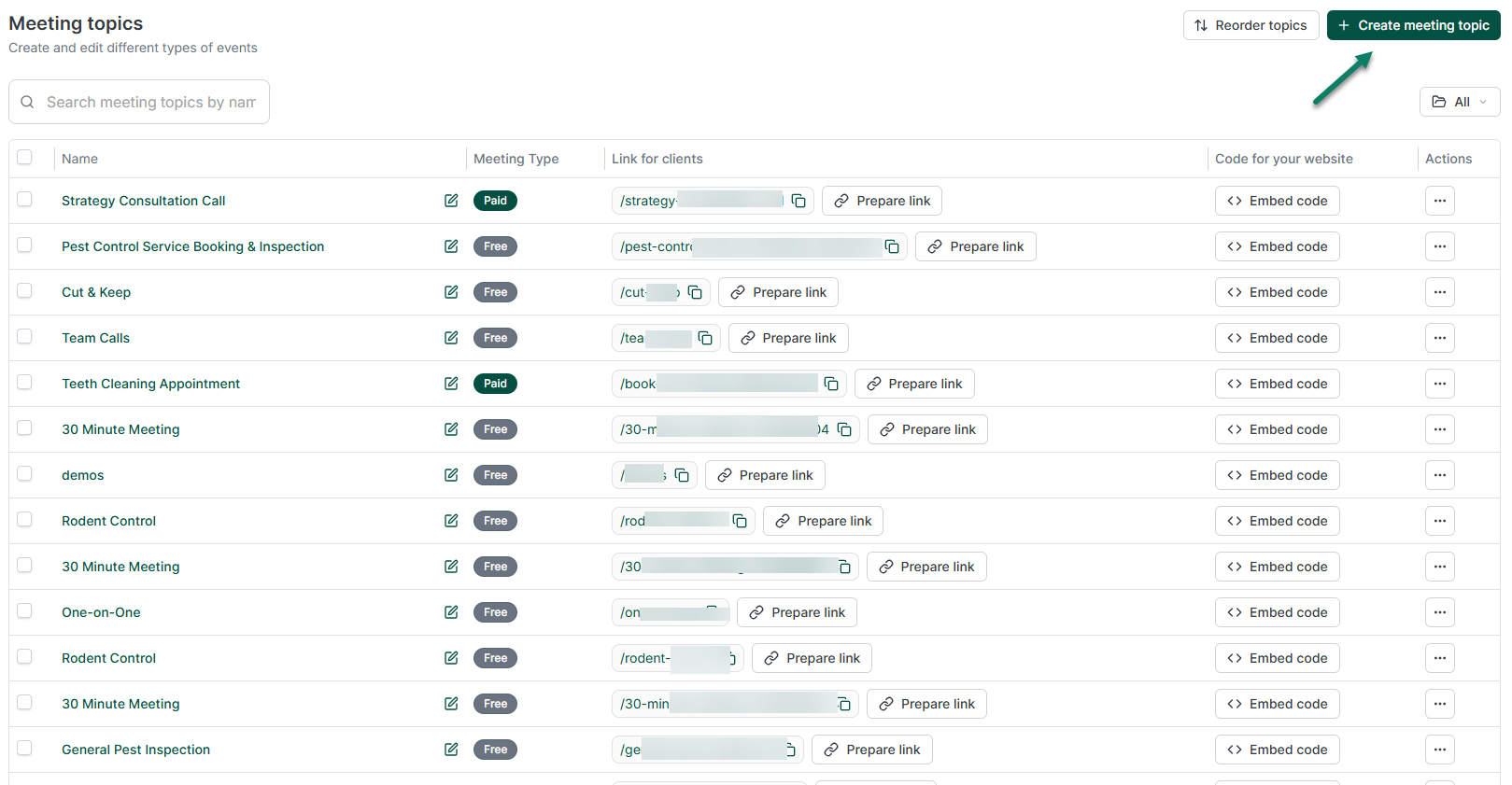
Each meeting topic can have its own duration, description, availability, location, form, booking rules, payment configuration, and cancellation policy. You might create separate booking options for a 30-minute introduction, a 60-minute consultation, and a two-hour strategy session, for example.
Can multiple people book the same time slot?
Yes. Zencal can support group meetings where many participants reserve places in the same session. You can set a maximum number of participants and use group bookings for classes, workshops, group consultations, or similar services.
Zencal also has a separate Events module when you are organizing something around a fixed date and registration process rather than repeatedly offering a bookable appointment.
Now, let's continue with our Zencal FAQ article.
Payments and selling services
Can clients pay when they book through Zencal?
Yes. You can require the customer to complete payment during the booking process.
The client sees the service, chooses an available time, and proceeds to the connected payment provider. Once payment succeeds, the appointment can be confirmed and the payment status remains connected with the booking.
https://www.youtube.com/watch?v=AcqDqDdg3XI
Which payment providers does Zencal support?
Zencal currently lists support for payment providers including:
- Stripe
- PayPal
- PayU
- Przelewy24
- tPay
- AutoPay
The exact payment methods available to the customer can depend on the payment provider you connect.
Does Zencal process the money itself?
No. Zencal connects your service and booking process with an external payment gateway, like Stripe. The payment gateway you have connected handles the actual transaction and Zencal doesn't hold the funds.
Does Zencal charge a commission when I sell a service?
Zencal currently charges 0% commission when you sell a service through the platform.
However, you still pay your normal Zencal subscription and any fees charged independently by your payment provider. For example, Stripe can charge its own payment-processing fees.
But Zencal does not add a percentage commission on top of the amount your customer pays for the service.
Can I offer deposits or allow clients to pay later?
Yes. Zencal's payment options include payment at booking, payment later, and deposits.
A deposit lets you take part of the price upfront rather than requiring the customer to pay the entire amount when booking.
That can be useful for expensive services where you want some financial commitment without requiring full advance payment.
Can I create different pricing options for the same service?
Yes. When configuring a paid meeting, you can create different pricing variants. A variant can have its own name, price, currency, number of sessions, and subscription settings.
That means you can sell one service in different ways rather than creating an entirely separate appointment type for every pricing option.
Can Zencal help with invoices and accounting documents?
Yes, although your exact setup depends on the integrations and payment method you use.
Zencal can collect invoice information during the purchase process, and its paid-service workflow can connect bookings, payments, and relevant accounting documents.
This Zencal FAQ article won't be complete without discussing the other features that make the tool unique.
Bundles, subscriptions, and events
Can I sell many appointments as one package?
Yes, and this feature is called Bundles.
Instead of asking a customer to buy five or ten appointments separately, you can create one package covering several sessions. You decide how many appointments to include, what the bundle costs, which services you'll offer, and how long the customer has to use it.
After purchasing, the customer receives a private link to schedule the included appointments. Zencal tracks the remaining appointments and when the bundle expires.
Can I organize webinars, workshops, or other events?
Yes. Zencal has an Events module for fixed-date group activities such as workshops, webinars, courses, and group sessions.
You can set the date, capacity, price, location, and the information you need from attendees. You then publish a registration page where people can reserve their places.
Events can be free or paid. Zencal can also manage registration status, attendee communication, reminders, and payment information.
Video meetings, integrations, and automation
Does Zencal integrate with Zoom?
Yes. When Zoom is connected, you can select it as the meeting location for a service.
A unique Zoom meeting can then be created when somebody books. Zencal will include the link in confirmation messages. It will also update it when your client reschedules an appointment, and remove it if they cancel the booking.
Does Zencal integrate with Google Meet and Microsoft Teams?
Yes. Zencal integrates with Google Meet and Microsoft Teams, and you use them after integrating their corresponding calendars. For example, Google and Microsoft calendar integrations allow Zencal to work with the associated meeting tools when creating appointments.
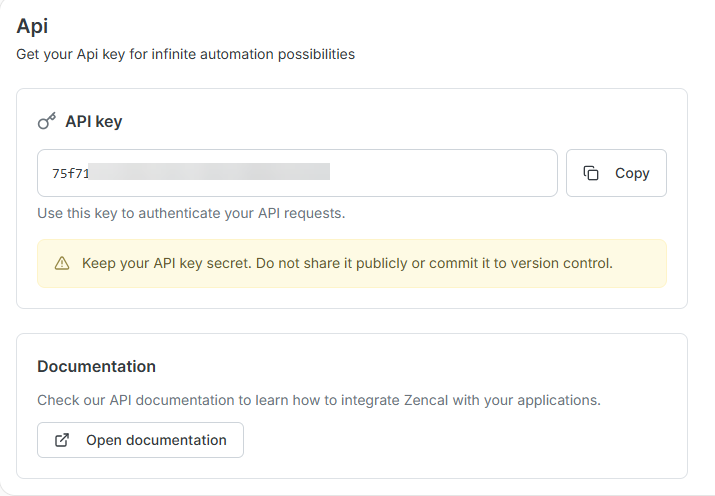
Does Zencal have an API?
Zencal provides API access for businesses that need their own integrations or workflows.
Does Zencal support webhooks?
Yes, Zencal supports Webhooks. Webhooks can send information to another application when something happens inside Zencal. Examples include a new booking, a rescheduled appointment, a cancellation, or a completed appointment.
This can be useful when you want Zencal activity to trigger something inside a CRM, internal application, automation platform, or another part of your business.
Teams and client management
Can several employees use the same Zencal account?
Yes. Zencal supports team scheduling. Each specialist can have their own availability, services, and connected calendars while clients still book through a shared system.
And depending on the employee's permission, they can also see your clients' data, revenue generated, and conversion metrics.
Can clients choose which team member they want?
Yes. You can allow customers to choose a particular specialist when booking. Alternatively, Zencal can automatically decide who should receive an appointment.
Does Zencal support round-robin scheduling?
Yes. Round-robin and automatic assignment are available for teams inside Zencal. Zencal can distribute appointments between eligible team members rather than requiring someone at reception to manually check several calendars and assign each new client.
Its team scheduling system can also account for individual availability and routing rules.
Does Zencal include client management?
Zencal includes client management where each client has a profile containing contact information, bookings, payments, and more. You can also import existing clients, export your database, keep private notes, and block clients you no longer want to accept bookings from.
https://www.youtube.com/watch?v=nYuSGV8foGc
Can I import clients I already have?
Yes. You can import an existing client database instead of starting your Zencal client list from zero. Zencal also supports exporting client information later.
Let's continue our Zencal FAQ post with reminders and client experience.
Reminders, forms, and the client experience
Does Zencal send appointment reminders and can I customize the reminder messages?
Yes, Zencal can automatically send email and SMS reminders before scheduled appointments. You can choose when to send reminders and customize the message content for your clients.
You can also build communication scenarios for confirmations, pre-appointment reminders, event registration messages, and follow-up messages after the service.
Can I ask questions before someone books?
Absolutely. You can ask as many questions as you want on your appointment booking page and collect information before accepting the appointment.
Zencal has many question field types, including short and long text responses, single-choice questions, multiple-choice questions, dropdowns, phone numbers, and file uploads.
You can also mark questions as required when the information is necessary before the meeting.
Can I collect terms, privacy, or other customer consent?
Yes. You can also add consent checkboxes to booking forms for things such as privacy policies, terms of service, cancellation rules, or marketing consent.
If you plan to sell services through Zencal, the platform also requires you to add your own Terms of Service and Privacy Policy. Zencal's current setup asks you to upload these documents as PDFs. Customers can then accept them during relevant booking and purchase flows.
Can I customize the Zencal booking page?
Absolutely. You can add branding such as your logo, profile photo, brand colors, background, description, contact details, and social links. Your page will have your business identity.
Can I embed Zencal on my existing website?
Of course, you can embed your Zencal booking pages on your website, so visitors do not necessarily have to leave your site before choosing a time.
You can also simply use a direct link when embedding does not make sense. It can be a link to your complete profile, an individual appointment type, or a team booking page.
Can Zencal collect client reviews?
Yes. Zencal includes a reviews feature to collect feedback on either the overall business or a particular service. You can send the review link manually or trigger a review request automatically after the service through Zencal's communication Scenarios.
Reporting and analytics
Does Zencal include business analytics?
Zencal has an Analytics module that brings together data from sales, bookings, marketing sources, team performance, traffic, and checkout activity. For example, you can use it to see sales performance, compare specialists, understand which campaigns generate business, and analyze conversion through the buying process.
Pricing and trial questions
How much does Zencal cost?
Zencal Pro costs $28 per specialist when paid monthly. Annual billing costs $280 per specialist per year, which works out to about $23.33 per month. That effectively gives you two months free compared with paying $28 every month.
Zencal also offers an Enterprise option for larger organizations requiring features such as dedicated infrastructure, a custom domain or subdomain, priority support, a dedicated account manager, and an SLA.
Are all Zencal features included in Pro?
No. The main Pro subscription includes features such as unlimited appointment types, unlimited bookings, unlimited calendar connections, paid appointments, subscriptions, round-robin scheduling, email reminders, calendar integrations, API access, webhooks, and supported payment integrations.
Some modules are sold separately. Current Pro add-on pricing includes:
- Events: $10 per month
- Bundles: $10 per month
- Clients: $10 per month
- Client portal: $28 per month
- Analytics: $10 per month
- Conversions: $8 per month
- SMS reminders: $0.08 per SMS
Enterprise includes these capabilities rather than pricing them as separate Pro add-ons.
Does Zencal offer a free trial?
Yes. Zencal currently offers 14 days of full access without requiring a credit card. That should give you enough time to connect your calendars, create appointment types, test the booking flow, and see how the platform fits your business before paying.
Are there limits on bookings?
No, you can create unlimited bookings per month, unlimited appointment types, unlimited calendar connections, and unlimited unique visitors.
So the base subscription is priced mainly around the number of specialists and any extra modules you choose, rather than charging you according to the number of clients who visit your booking pages.
Does Zencal offer discounts for larger teams?
Yes. The current annual pricing is $280 per specialist, with team discounts as the number of specialists grows. Zencal currently lists a 5% discount at 10 specialists, another increase at 20, and a maximum 15% team discount at 30 specialists.
We do not charge for support roles such as administrators, reception staff, and view-only accounts.
Data, privacy, and security
Where is Zencal's infrastructure hosted?
Zencal's core cloud infrastructure is hosted in Frankfurt, Germany, within the European Union. We use DigitalOcean for our core cloud infrastructure and hosting.
Some of the third-party services we use may process data in other regions, depending on the provider. You can find full details about our infrastructure, data processing, and subprocessors in our Data Processing Agreement and Sub-processors list.
Does Zencal support GDPR requirements?
Yes. Zencal processes entrusted personal data under a GDPR Data Processing Agreement, and an Article 28 DPA forms part of our service terms. We also apply appropriate technical and organisational safeguards to protect the personal data processed through Zencal.
When one of our subprocessors is located outside the European Economic Area, we use appropriate safeguards where required, including Standard Contractual Clauses approved by the European Commission.
Keep in mind that your business is still responsible for matters such as establishing the appropriate legal basis for processing personal data, setting retention rules, managing access, and deciding how client information should be used.
Can healthcare or therapy businesses store sensitive client information in Zencal?
Yes, but sensitive client information requires some additional consideration.
If you're a psychologist, therapist, physiotherapist, or another professional working with special-category personal data, we can help you review your intended workflow, the types of data you plan to process, and the relevant agreements before migration.
Zencal supports a GDPR-aligned process, but your organisation remains responsible for determining the appropriate legal basis, retention rules, access controls, and use of sensitive information. We recommend reviewing these requirements before storing special-category client data in Zencal.
Can I move my existing data to Zencal?
Yes. You don't need to rebuild everything from scratch when moving to Zencal.
You can connect your existing Google Calendar, Microsoft Outlook, or iCloud Calendar and continue using it as before. We'll check those calendars for conflicts and add new Zencal bookings to the calendars you've connected.
You can also import existing client data into Zencal. If you're planning a larger migration, our team can help you plan the process before making changes that affect your clients.
Can I export my data if I stop using Zencal?
Yes. You can export your client data from Zencal.
Our client management tools let you both import existing clients and export your client database. This gives you access to your customer information if you decide to move to another system or simply need a copy of your data outside Zencal.
Zencal FAQ: To summarize
Zencal gives you one place to manage bookings, payments, clients, reminders, subscriptions, events, and more. Whether you work independently or manage a larger team, you can choose the features that fit your business and connect Zencal with the tools you already use.
We hope this Zencal FAQ answered your questions. And if you still want to see how everything works in practice, the easiest way is to try it yourself. Start your free Zencal trial today.